In this tutorial we are going to create Web Button. This is very simple and quite effective tutorial, so all you need is Adobe Photoshop to create this effect. I hope you will enjoy this tutorial.
[ad#co-1]
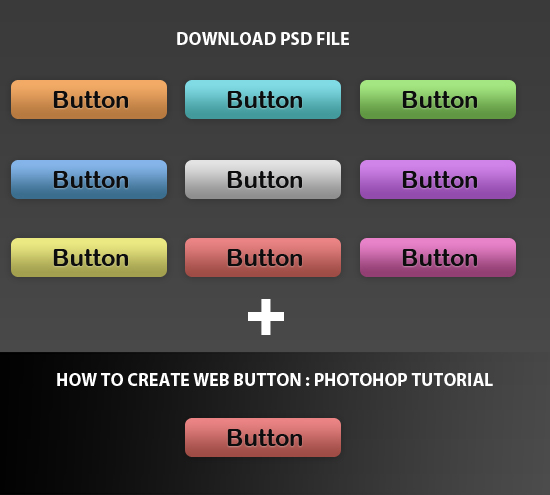

How to Create Web Button in Photoshop
Step #1
Open photoshop and create a new document, mine is 550px×125px with a white background.

Step#2
Fill the color in background layer, mine color is #3A3A3A.
Step #3
Select the Rounded Rectangle Tool and create button, mine Radius is 7px, width: 156px and height: 38px..

Step #4
Now we will apply some effect
Gradient Overlay
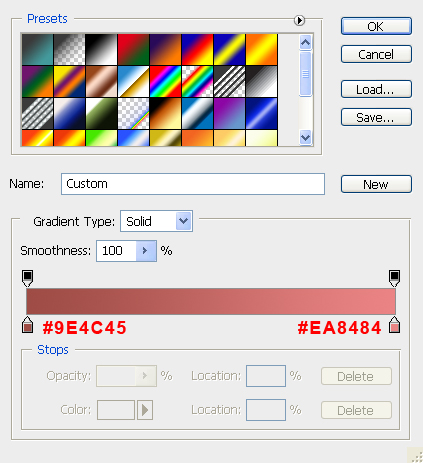
Styling the Button double-click on the Button Layer’s thumbnail in the Layers Panel to open up the Layer Styles dialog box, we will apply a Vertical Gradient Effect for your Button. Then click on the Color Gradient on the right of the Gradient option to open up the Color Gradient Editor.

Double-click on left-color-stop and enter the color value #9E4C45, then double-click on right-color-stop and enter the color value #EA8484.
Drop Shadow
Next apply the Drop Shadow layer style. Keep the Angle at 120o, than changing the values of Opacity, Distance and Size. I choose to set the Opacity at 23%, Distance at 1px and Size at 9px.

Step #5
Select Horizontal Type Tool and Type Text on front.

We will apply some effect for text.
Color Overlay
Double-click on the Text layer’s thumbnail in the Layers Panel to open up the Layer Styles dialog box. First we will apply color overlay, i choose the colour #0D0D0E

Drop Shadow
Finally we will apply the Drop Shadow, first change the Blending option to Normal. Change the Shadow Color from the default to #FFFFFF. Keep the Angle at 120o, than changing the values of Opacity, Distance and Size . I choose to set the Opacity at 32% and Distance at 1px and Size at 1px.

Final Preview

Let us know how that this tutorial can be more better? If you found any other photoshop tutorial that you want to share with us,feel free to let us know by dropping in a comment.
if you would like to receive more inspiration from us, please consider subscribing to our feed by RSS or by email.
This article has been shared on favSHARE.net. Go and vote it!
Pingback: tripwire magazine | tripwire magazine
Pingback: 140+ Fresh Articles for Designers and Developers | Afif Fattouh - Web Specialist
there is an error in the download link. alien characters appear. looking for fix.
Pingback: Green, red, blue, yellow Web Buttons psd file Button Psd Files | Buttons | Download Free PSD
nice download buttons. well explained and easy to understand. any novice web designer can understand and do it well with your how to guide for photoshop.
excellent job v+++++++++++
cool buttons and easy to grasp .
excellent tutorial