• 家
  • 大約
  • 文章
  • 聯繫我們

: 91 11 9810018780 郵寄到 : info@aceinfowayindia.com / 電話 : 91 11九十八萬一千〇一點八七八萬

  • 文章
  • 關於2009年7月3號
  • 在下午12點01分
  • 由管理員

如何創建的CSS三欄佈局

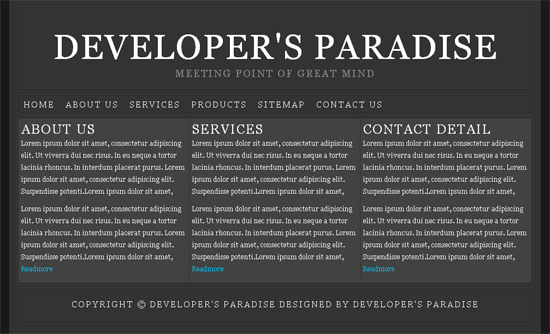
這是一個教程如何使用CSS創建一個簡單的三欄佈局。
佈局包括一個頭,一個主要內容欄,一個工具,和頁腳。 一個相當基本的佈局,而不是在所有的困難,創造利用CSS一旦你知道如何應付不可避免的Internet Explorer的漏洞。

three-coloumn-css-layout
鏈球菌第一:我們創建一個基本的HTML結構

> <div id = "header" > <div id = "sub-header" > </div> </div> <div id = "nevigation" > <ul> <li> <a href = "#" > Home </a> </li> <li> <a href = "#" > About us </a> </li> <li> <a href = "#" > Services </a> </li> <li> <a href = "#" > Products </a> </li> <li> <a href = "#" > Sitemap </a> </li> <li> <a href = "#" > Contact Us </a> </li> </ul> </div> <div id = "content" > <div id = "sub-content" > <div id = "column1" > <h2> About Us </h2> <p> Lorem ipsum dolor sit amet, consectetur                    adipiscing elit. <div 編號 = "page" “ <div 編號 = "header" ” <div 編號 = "sub-header" “ ” /科“ ” /科“ <div 編號 = "nevigation" ” <ul> <li> “一 href = “ # ” “ ”首頁< / a “ ” /李“ <li>的<a href = "#" ”關於我們“ / 1 ” “ /李” <li>的<a href = "#" “服務” / 1 “ ” /李“ <li>的<a href = "#" ”產品“ / 1 ” “ /李” <li>的<a href = "#" “網站” / 1 “ ” /李“ <li> ” 1 href = “ # ” “聯繫我們” / 1 “ ” /李“ ” / UL認證“ ” /科“ <div 編號 = "content" ” <div 編號 = "sub-content" “ ”股利 編號 = “ column1 ” “ <h2>關於我們” /氫氣“ <p> Lorem本身悲楚坐在阿梅特, consectetur adipiscing elit 。 UT斯達康靈貓堆NEC公司risus 。歐盟neque 1 tortor lacinia rhoncus 。 在interdum placerat普魯斯。 Lorem本身悲楚坐在阿梅特, consectetur adipiscing elit 。 Suspendisse potenti.Lorem本身悲楚坐在阿梅特, “ /人” <p> Lorem本身悲楚坐在阿梅特, consectetur adipiscing elit 。 UT斯達康靈貓堆NEC公司risus 。歐盟neque 1 tortor lacinia rhoncus 。 在interdum placerat普魯斯。 > Readmore </a> </p> </div> <div id = "column2" > <h2> Services </h2> <p> Lorem ipsum dolor sit amet, consectetur                    adipiscing elit. Lorem本身悲楚坐在阿梅特, consectetur adipiscing elit 。 Suspendisse potenti.Lorem本身悲楚坐在阿梅特,的<a href = "#" “ Readmore ” / 1 “ ” /人“ ” /科“ <div 編號 = "column2" ” “的H2 “服務” /氫氣“ <p> Lorem本身悲楚坐在阿梅特, consectetur adipiscing elit 。 UT斯達康靈貓堆NEC公司risus 。歐盟neque 1 tortor lacinia rhoncus 。 在interdum placerat普魯斯。 Lorem本身悲楚坐在阿梅特, consectetur adipiscing elit 。 Suspendisse potenti.Lorem本身悲楚坐在阿梅特, “ /人” <p> Lorem本身悲楚坐在阿梅特, consectetur adipiscing elit 。 UT斯達康靈貓堆NEC公司risus 。歐盟neque 1 tortor lacinia rhoncus 。 在interdum placerat普魯斯。 > Readmore </a> </p> </div> <div id = "column3" > <h2> Contact Detail </h2> <p> Lorem ipsum dolor sit amet, consectetur                    adipiscing elit. Lorem本身悲楚坐在阿梅特, consectetur adipiscing elit 。 Suspendisse potenti.Lorem本身悲楚坐在阿梅特,的<a href = "#" “ Readmore ” / 1 “ ” /人“ ” /科“ <div 編號 = "column3" ” “的H2 “聯絡資料” /氫氣“ <p> Lorem本身悲楚坐在阿梅特, consectetur adipiscing elit 。 UT斯達康靈貓堆NEC公司risus 。歐盟neque 1 tortor lacinia rhoncus 。 在interdum placerat普魯斯。 Lorem本身悲楚坐在阿梅特, consectetur adipiscing elit 。 Suspendisse potenti.Lorem本身悲楚坐在阿梅特, “ /人” <p> Lorem本身悲楚坐在阿梅特, consectetur adipiscing elit 。 UT斯達康靈貓堆NEC公司risus 。歐盟neque 1 tortor lacinia rhoncus 。 在interdum placerat普魯斯。 > Readmore </a> </p> </div> </div> </div> <div id = "bottom" > <div id = "sub-bottom" > <span> Copyright &copy; Developer's Paradise                    Designed By Developer's Paradise </span> </div> </div> </div> Lorem本身悲楚坐在阿梅特, consectetur adipiscing elit 。 Suspendisse potenti.Lorem本身悲楚坐在阿梅特,的<a href = "#" “ Readmore ” / 1 “ ” /人“ ” /科“ ” /科“ ” /科“ ”股利 編號 = “自下而上” “ <div 編號 = "sub-bottom" ” <span> 版權所有開發的天堂製作開發的天堂“ /跨度” “ /科” “ /科” “ /科”

第二步:我們創建一個基本的CSS結構

; padding : 0 ; } h1,h2,h3,h4 { font : 100 % "Georgia" , Times New Roman, Times, serif ; color : #fff ; text-transform :uppercase ; letter-spacing : 2px } h1 { font-size : 400 %; text-align :center ; padding : 35px 0 0 0 ; } h2 { font-size : 150 %; } h3 { font-size : 137 %; } h4 { font-size : 120 %;text-align :center ; color : # 848484 ; } ul,ol,li { list-style-type :none ; } a { text-decoration :none ; color : #00CCFF } a :hover { text-decoration :underline ; } p { color : #fff ; font-size : 12px ; font-family : "Georgia" , Times New Roman, Times, serif ; color : #fff ; padding : 0 0 10px 0 ; line-height : 22px ; } * (保證金: 0 ;填充: 0 ; )上半年,氫氣,蛋白H3 , H4燈口(字體: 100 % “格魯吉亞” ,每一個嘮叨,時間線 ; 顏色 : #足協 ;文本轉換:大寫 ;字母間距: 2px )上半年(字體大小: 400 % ;文本對齊:中心 ;填充: 35px 0 0 0 ; )的H2 (字體大小: 150 % ; )蛋白H3 (字體大小: 137 % ; ) H4燈口(字體大小: 120 % ;文本對齊:中心 ; 顏色 : # 848484 ; ) UL認證,醇,李(列表樣式類型:無 ; ) 1 (文字修飾:無 ; 顏色 : # 00CCFF )答:懸停 (文字裝修:突出 ; ) p ( 顏色 : #足協 ;字體大小: 12px ; font - family的: “格魯吉亞” ,每一個嘮叨,時間線 ; 顏色 : #足協 ;填充: 0 0 10px 0 ;行高: 22px ; )
% normal "Georgia" , Times New Roman, Times, serif ; background : # 191919 ; }機構(字體: 100 % 正常 “格魯吉亞” ,每一個嘮叨,時間線 ; 背景 : # 191919 ; )
background : # 323232 ; width : 971px ; margin : 0 auto ; height : 100 %; border-left : 1px solid # 353535 ; border-right : 1px solid # 353535 ; padding : 12px 0 12px 0 ; } #頁 ( 背景 : # 323232 ;寬度: 971px ;利潤率: 0 汽車 ;身高: 100 % ;邊界左: 1px 堅實 # 353535 ;邊界權: 1px 堅實 # 353535 ;填充: 12px 0 12px 0 ; )
margin : 0px auto 0 auto ; width : 943px ; background : # 222 ; border : 1px solid # 424242 ; } #sub-header { margin : 1px ; padding : 1px ; background : # 333 ; overflow :hidden ; height : 150px ; } #頭 ( 保證金 : 0px 汽車 0 汽車 ;寬度: 943px ; 背景 : # 222 ;邊界: 1px 堅實 # 424242 ; ) #子頭 (保證金: 1px ;填充: 1px ; 背景 : # 333 ;溢出:隱藏 ;高度: 150px ; )
margin : 5px auto 0 auto ; width : 943px ; background : # 222 ; border : 1px solid # 424242 ; } #nevigation ul { margin : 1px ; padding : 0px ; background : # 333 ; overflow :hidden ; } #nevigation li { display : inline ; /*ie*/ } #nevigation li a { float :left ; margin : 0 ; padding : 7px 10px ; display : block ; color : #fff ; text-transform :uppercase ; letter-spacing : 2px ; } #nevigation li a :hover { background : # 424242 ; text-decoration :none ; color : #00CCFF ; } #導航 ( 保證金 : 5px 汽車 0 汽車 ;寬度: 943px ; 背景 : # 222 ;邊界: 1px 堅實 # 424242 ; ) #導航 UL認證(保證金: 1px ;填充: 0px ; 背景 : # 333 ;溢出:隱藏 ; ) #導航李( 顯示 : 內置 ; / *即* / ) #導航李(浮動:左 ;保證金: 0 ;填充: 7px 10px ; 顯示 : 塊 ; 顏色 : #足協 ;文本轉換:大寫 ;字母間距: 2px ; ) #導航李答:懸停 ( 背景 : # 424242 ;文字修飾:無 ; 顏色 : # 00CCFF ; )
width : 943px ; margin : 5px auto 0 auto ; background : # 222 ; border : 1px solid # 424242 ; } #sub-content { margin : 1px ; padding : 1px ; background : # 333 ; overflow :hidden ; } #內容 (寬度: 943px ;利潤率: 5px 汽車 0 汽車 ; 背景 : # 222 ;邊界: 1px 堅實 # 424242 ; ) #分內容 (利潤率: 1px ;填充: 1px ; 背景 : # 333 ;溢出:隱藏 ; )
width : 302px ; background : # 424242 ; margin : 0 1px 0 0 ; padding : 5px ; float :left ; } #column2 { width : 302px ; background : # 424242 ; margin : 0 1px 0 0 ; padding : 5px ; float :left ; } #column3 { width : 303px ; background : # 424242 ; margin : 0 ; padding : 5px ; float :left ; } # column1 (寬度: 302px ; 背景 : # 424242 ;保證金: 0 1px 0 0 ;填充: 5px ;浮動:左 ; ) # column2 (寬度: 302px ; 背景 : # 424242 ;保證金: 0 1px 0 0 ;填充: 5px ;浮動:左 ; ) # column3 (寬度: 303px ; 背景 : # 424242 ;保證金: 0 ;填充: 5px ;浮動:左 ; )
width : 943px ; margin : 5px auto 0 auto ; background : # 222 ; border : 1px solid # 424242 ; } #sub-bottom { margin : 1px ; padding : 20px 0 0 0px ; background : # 333 ; overflow :hidden ; height : 50px ; color : #fff ; text-align :center ; text-transform :uppercase ; letter-spacing : 2px ; } # ( 底部寬度: 943px ;利潤率: 5px 汽車 0 汽車 ; 背景 : # 222 ;邊界: 1px 堅實 # 424242 ; ) #分底部 (利潤率: 1px ;填充: 20px 0 0 0px ; 背景 : # 333 ;溢出:隱藏 ;高度: 50px ; 顏色 : #足協 ;文本對齊:中心 ;文本轉換:大寫 ;字母間距: 2px ; )

最後,我們已經設立了三個欄的CSS佈局。 查看示例和下載此文件 。

請將您可以進行第二次,以幫助促進我的博客和分享此鏈接與您的任何贊成網絡網站使用下面的鏈接...

分享與支持:
  • Digg
  • del.icio.us
  • Mixx
  • Design Float
  • StumbleUpon

提起下: 的CSS , 教程的管理

標籤: 的CSS , 教程

相關文章:

如果你喜歡閱讀本文,請參閱其他有關條款如下:

    • 的CSS提示如果使用JavaScript
    • 如何創建懸停效果塊的鏈接列表
    • 簡單2欄的CSS佈局
    • 如何創造良好的期待形式的表
    • 簡單Verticale菜單教程
無標題文檔

提交評論

必填

的XHTML :您可以使用這些標籤:的<a href="" title=""> <abbr title=""> <acronym title="">的<b> <blockquote cite=""> <cite>的<code> “刪除日期時間= “ ” “的<em>的<i> <q cite=""> <strike>的<strong>


« 開發的天堂的網站在一周的2009年7月02nd
純粹的CSS下拉菜單沒有使用JavaScript »
無標題文檔

  • 訂閱的簡易信息聚合
  • |
  • 訂閱通過電子郵件
贊助商 贊助商
贊助商 贊助商 贊助商

    • 搜索

  • 日曆

    2009年7月
    M Ť W Ť F 縣 縣
    «六月
    1 2 3 4 5
    6 7 8 9 10 11 12
    13 14 15 16 17 18 19
    20 21 22 23 24 25 26
    27 28 29 30 31
    • 網頁

      • 家
      • 大約
      • 文章
      • 聯繫我們
    • 分類

    • 的CSS ( 15 )
    • 設計/啟示 ( 29 )
    • 免費 ( 10 )
    • 平面設計 ( 7 )
    • 軟件 ( 5 )
    • 資源 ( 12 )
    • 徐 ( 1 )
    • 工具 ( 4 )
    • 教程 ( 18 )
    • 印刷術 ( 1 )
    • Web開發 ( 4 )
    • WordPress的 ( 3 )
    • 檔案

    • 2009年7月
    • 2009年6月
    • 2009年5月
    • 最近的帖子

    • 的CSS
    • 設計/啟示
    • 免費
    • 平面設計
    • 軟件
    • 熱門帖子

    • 歡迎諮詢
    • 教程 , 以創造一個美好的,簡單的,橫向的CSS菜單
    • 25網站頁腳設計,潮流和風格
    • 25網頁設計組合的網站設計靈感
    • 簡單2欄的CSS佈局
    • 20個網站 , 木材背景
    • 開發者的天堂的網站在一周的2009年6月18日
    • 標籤雲

    的CSS 設計 字體 免費 平面設計 圖形設計 圖標 啟示 的Photoshop 資源 工具 教程 印刷術 Web開發 WordPress的

    • 朋友們

      • Abduzeedo
      • Alist除了
      • Bittbox
      • CrazyLeaf設計
      • 的CSS技巧
      • 大衛沃爾什
      • Fudgegraphics
      • 燃料你的創造力
      • 幫助開發
      • 即時移位
      • Line25
      • Mirificampress
      • 我國油墨博客
      • Noupe
      • PSDFan
      • PSDtuts
      • 分享腦
      • 六修訂
      • 勺圖形
      • Toxel
      • Vandelay設計
      • 我們的功能
      • 網頁設計師站
      • 網頁設計師總帳
      • 網頁設計師牆
      • 您的設計師
    • 譯者

      English flagItalian flagKorean flagChinese (Simplified) flagChinese (Traditional) flagPortuguese flagGerman flagFrench flagSpanish flagJapanese flagArabic flagRussian flagGreek flagDutch flagBulgarian flagCzech flagCroat flagDanish flagFinnish flagHindi flagPolish flagRumanian flagSwedish flagNorwegian flagCatalan flagFilipino flagHebrew flagIndonesian flagLatvian flagLithuanian flagSerbian flagSlovak flagSlovenian flagUkrainian flagVietnamese flagAlbanian flagEstonian flagGalician flagMaltese flagThai flagTurkish flagHungarian flag
。
無標題文檔
返回頂部

一般

這些可能的一些利益
  • 關於我們公司
  • 感言
  • 聯繫方式
  • 博客
  • 社會- Twitter的,的Flickr

工程

過去的項目的例子
  • 關於我們公司
  • 感言
  • 聯繫方式
  • 博客
  • 社會- Twitter的,的Flickr

服務

這是今天在那裡賣
  • 關於我們公司
  • 感言
  • 聯繫方式
  • 博客
  • 社會- Twitter的,的Flickr

聯繫方式

想聘請我們? 從這裡開始...
  • 免費項目評估
  • 電子郵件- info@aceinfowayindia.com
  • 電話: 91 11九十八萬一千○一點八七八萬

版權所有© 2009年版權所有, 王牌Infoway印度服務王牌Infoway印度設計為您的下一個項目。 查看我們的投資組合 。