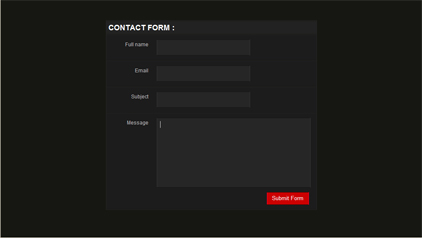
Como criar bonitão formulário sem tabela
Este tutorial explica como criar uma boa forma usando um desenho limpo CSS apenas com rótulo e entrada tags HTML para simular uma tabela estrutura. Você pode usar todos os CSS / HTML elementos para conceber o seu formulário personalizado para os seus projectos na web: 
Passo 1: Criar uma estrutura HTML básico
> <h1> Contact Form : </h1> <label> <span> Full name </span> <input type = "text" class = "input_text" name = "name" id = "name" / > </label> <label> <span> Email </span> <input type = "text" class = "input_text" name = "email" id = "email" / > </label> <label> <span> Subject </span> <input type = "text" class = "input_text" name = "subject" id = "subject" / > </label> <label> <span> Message </span> <textarea class = "message" name = "feedback" id = "feedback" > </textarea> <input type = "button" class = "button" value = "Submit Form" / > </label> </div> </form> <form> <div class = "box"> <h1> Formulário de Contato: </ h1> <label> <span> Nome completo </ span> <input type = "text" class = "input_text" name = "nome" id = "nome" /> </ label> <label> <span>-mail </ span> <input tipo = "text" class = "input_text" name = "email" id = "email" /> </ label> <label> <span> Assunto </ span> <input tipo = "text" class = "input_text" name = "subject" id = "subject" /> </ label> <label> <span> Mensagem </ span> <textarea "message" class = nome = "feedback" id = "feedback"> </ textarea> <input tipo = "button" class = "button" valor = "Submit Form" /> </ label> </ div> </ form>
Etapa: 2 Criar Código CSS
; padding : 0 ; } body { font : 100 % normal Arial, Helvetica, sans-serif ; background : # 161712 ; } form,input,select,textarea { margin : 0 ; padding : 0 ; color : #ffffff ; } div .box { margin : 0 auto ; width : 500px ; background : # 222222 ; position :relative ; top : 50px ; border : 1px solid # 262626 ; } div .box h1 { color : #ffffff ; font-size : 18px ; text-transform :uppercase ; padding : 5px 0 5px 5px ; border-bottom : 1px solid # 161712 ; border-top : 1px solid # 161712 ; } div .box label { width : 100 %; display : block ; background : #1C1C1C ; border-top : 1px solid # 262626 ; border-bottom : 1px solid # 161712 ; padding : 10px 0 10px 0 ; } div .box label span { display : block ; color : #bbbbbb ; font-size : 12px ; float :left ; width : 100px ; text-align :right ; padding : 5px 20px 0 0 ; } div .box .input_text { padding : 10px 10px ; width : 200px ; background : # 262626 ; border-bottom : 1px double # 171717 ; border-top : 1px double # 171717 ; border-left : 1px double # 333333 ; border-right : 1px double # 333333 ; } div .box .message { padding : 7px 7px ; width : 350px ; background : # 262626 ; border-bottom : 1px double # 171717 ; border-top : 1px double # 171717 ; border-left : 1px double # 333333 ; border-right : 1px double # 333333 ; overflow :hidden ; height : 150px ; } div .box .button { margin : 0 0 10px 0 ; padding : 4px 7px ; background : #CC0000 ; border : 0px ; position : relative ; top : 10px ; left : 382px ; width : 100px ; border-bottom : 1px double # 660000 ; border-top : 1px double # 660000 ; border-left : 1px double #FF0033 ; border-right : 1px double #FF0033 ; } * (Margin: 0; padding: 0;) body (font: normal 100% Arial, Helvetica, sans-serif; background: # 161712;) forma, entrada, escolha, textarea (margin: 0; padding: 0; cor: # ffffff;) div. caixa (margin: 0 auto; width: 500px; background: # 222222; position: relative; top: 50px; border: 1px solid # 262626;) div. caixa h1 (color: # ffffff; font - size: 18px; text-transform: uppercase; padding: 5px 0 5px 5px; border-bottom: 1px solid # 161712; border-top: 1px solid # 161712;) div. rótulo caixa (width: 100%; display: block; background: # 1C1C1C; border-top: 1px solid # 262626; border-bottom: 1px solid # 161712; padding: 10px 0 10px 0;) div. rótulo caixa span (display: block; color: # bbbbbb; font-size: 12px; float: left; width: 100px; text-align: right; padding: 5px 20px 0 0;) div. casa. input_text (padding: 10px 10px, width: 200px; background: # 262626; border-bottom: 1px dupla # 171717; border-top: 1px duplo # 171717; border-left: 1px double # 333333; border-right: 1px double # 333333;) div. caixa. mensagem (padding: 7px 7px; width: 350px; background: # 262626 ; border-bottom: 1px double # 171717; border-top: 1px double # 171717; border-left: 1px double # 333333; border-right: 1px double # 333333; overflow: hidden; height: 150px;) div. caixa. button (margin: 0 0 10px 0; padding: 4px 7px; background: # cc0000; border: 0px; position: relative; top: 10px; esquerda: 382px; width: 100px; border-bottom: 1px double # 660000;-fronteira top: 1px double # 660000; border-left: 1px double # FF0033; border-right: 1px double # FF0033;)
finalmente estamos a fazer. Criámos uma boa forma, sem olhar tabela. Ver Exemplo
Artigos Relacionados:
Se você gozava leitura deste artigo, veja outros artigos relacionados a seguir:


Enviar um comentário