Kuidas luua häid otsin moel ilma tabel
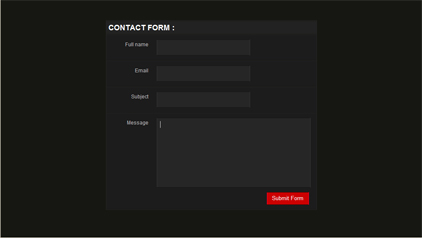
See Juhendaja selgitab, kuidas kujundada head vormi puhas CSS design ainult märgistusel ja sisendi tags simuleerida HTML tabeli struktuuri. Teil on võimalik kasutada kõiki CSS / HTML elementide projekteerimine Teie kohandatud kujul Web projektid: 
Samm 1: Loo basic HTML struktuur
> <h1> Contact Form : </h1> <label> <span> Full name </span> <input type = "text" class = "input_text" name = "name" id = "name" / > </label> <label> <span> Email </span> <input type = "text" class = "input_text" name = "email" id = "email" / > </label> <label> <span> Subject </span> <input type = "text" class = "input_text" name = "subject" id = "subject" / > </label> <label> <span> Message </span> <textarea class = "message" name = "feedback" id = "feedback" > </textarea> <input type = "button" class = "button" value = "Submit Form" / > </label> </div> </form> <form> <div class = "box"> <h1> Kontaktandmed Vorm: </ h1> <label> <span> Täielik nimi </ span> <input type = "text" class = "input_text" name = "nimi" id = "name" /> </ Label> <label> <span> e-post </ span> <input type = "text" class = "input_text" name = "email" id = "email" /> </ Label> <label> <span> Teema </ span> <input type = "text" class = "input_text" name = "subject" id = "subject" /> </ Label> <label> <span> Sõnum </ span> <textarea class = "message" name = "feedback" id = "feedback"> </ Textarea> <input type = "button" class = "button" väärtus = "Submit Form" /> </ Label> </ div> </ form>
Samm: 2 Loo CSS Kood
; padding : 0 ; } body { font : 100 % normal Arial, Helvetica, sans-serif ; background : # 161712 ; } form,input,select,textarea { margin : 0 ; padding : 0 ; color : #ffffff ; } div .box { margin : 0 auto ; width : 500px ; background : # 222222 ; position :relative ; top : 50px ; border : 1px solid # 262626 ; } div .box h1 { color : #ffffff ; font-size : 18px ; text-transform :uppercase ; padding : 5px 0 5px 5px ; border-bottom : 1px solid # 161712 ; border-top : 1px solid # 161712 ; } div .box label { width : 100 %; display : block ; background : #1C1C1C ; border-top : 1px solid # 262626 ; border-bottom : 1px solid # 161712 ; padding : 10px 0 10px 0 ; } div .box label span { display : block ; color : #bbbbbb ; font-size : 12px ; float :left ; width : 100px ; text-align :right ; padding : 5px 20px 0 0 ; } div .box .input_text { padding : 10px 10px ; width : 200px ; background : # 262626 ; border-bottom : 1px double # 171717 ; border-top : 1px double # 171717 ; border-left : 1px double # 333333 ; border-right : 1px double # 333333 ; } div .box .message { padding : 7px 7px ; width : 350px ; background : # 262626 ; border-bottom : 1px double # 171717 ; border-top : 1px double # 171717 ; border-left : 1px double # 333333 ; border-right : 1px double # 333333 ; overflow :hidden ; height : 150px ; } div .box .button { margin : 0 0 10px 0 ; padding : 4px 7px ; background : #CC0000 ; border : 0px ; position : relative ; top : 10px ; left : 382px ; width : 100px ; border-bottom : 1px double # 660000 ; border-top : 1px double # 660000 ; border-left : 1px double #FF0033 ; border-right : 1px double #FF0033 ; } * (Margin: 0; padding: 0;) body (font: 100% tavalist Arial, Helvetica, sans-serif; background: # 161712;) vormi, sisestada, valige Textarea (margin: 0; padding: 0; värv: # ffffff;) div. box (margin: 0 auto; width: 500px; background: # 222222; seisukoht: suhteline; top: 50px; border: 1px solid # 262626;) div. box h1 (color: # ffffff; font - size: 18px; text-teisendus: suurtäheliseks; padding: 5px 0 5px 5px; border-bottom: 1px solid # 161712; border-top: 1px solid # 161712;) div. kasti label (width: 100%; kuva: ploki; background: # 1C1C1C; border-top: 1px solid # 262626; border-bottom: 1px solid # 161712; padding: 10px 0 10px 0;) div. kasti etiketil span (kuva: ploki; color: # bbbbbb; font-size: 12px; float: left; width: 100px; text-align: right; padding: 5px 20px 0 0;) div. kasti. input_text (padding: 10px 10px; width: 200px; background: # 262626; border-bottom: 1px double # 171717; border-top: 1px double # 171717; border-left: 1px double # 333333; border-right: 1px double # 333333;) div. kasti. sõnumi (padding: 7PX 7PX; width: 350px; background: # 262626 ; border-bottom: 1px double # 171717; border-top: 1px double # 171717; border-left: 1px double # 333333; border-right: 1px double # 333333; overflow: hidden; height: 150px;) div. kasti. nupp (margin: 0 0 10px 0; padding: 4px 7PX; background: # cc0000; border: 0px; seisukoht: suhteline; top: 10px; left: 382px; width: 100px; border-bottom: 1px double # 660000; piirikontrolli top: 1px double # 660000; border-left: 1px double # FF0033; border-right: 1px double # FF0033;)
lõpuks me oleme teinud. Oleme loonud head otsin moel ilma tabelis. Kuva Näide
Seotud artiklid:
kui te nautida lugemine see artikkel, kontrollige muid esemeid, mis on seotud allpool:


Saada kommentaar