
This tutorial explains how to design a good form using a clean CSS design with only label and input tags to simulate an HTML table structure. You can use all CSS/HTML elements to design your custom form for your web projects:
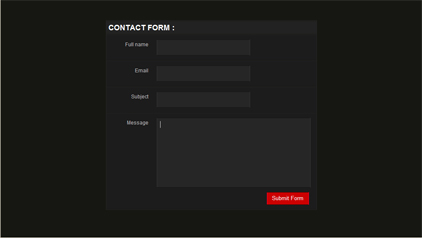
Step 1: Create basic HTML structure
[code lang="htmlstrict"][/code]
Step:2 Create CSS Code
[code lang="css"]
*{ margin:0; padding:0;}
body{ font:100% normal Arial, Helvetica, sans-serif; background:#161712;}
form,input,select,textarea{margin:0; padding:0; color:#ffffff;}

div.box {
margin:0 auto;
width:500px;
background:#222222;
position:relative;
top:50px;
border:1px solid #262626;
}

div.box h1 {
color:#ffffff;
font-size:18px;
text-transform:uppercase;
padding:5px 0 5px 5px;
border-bottom:1px solid #161712;
border-top:1px solid #161712;
}

div.box label {
width:100%;
display: block;
background:#1C1C1C;
border-top:1px solid #262626;
border-bottom:1px solid #161712;
padding:10px 0 10px 0;
}

div.box label span {
display: block;
color:#bbbbbb;
font-size:12px;
float:left;
width:100px;
text-align:right;
padding:5px 20px 0 0;
}

div.box .input_text {
padding:10px 10px;
width:200px;
background:#262626;
border-bottom: 1px double #171717;
border-top: 1px double #171717;
border-left:1px double #333333;
border-right:1px double #333333;
}

div.box .message{
padding:7px 7px;
width:350px;
background:#262626;
border-bottom: 1px double #171717;
border-top: 1px double #171717;
border-left:1px double #333333;
border-right:1px double #333333;
overflow:hidden;
height:150px;
}

div.box .button
{
margin:0 0 10px 0;
padding:4px 7px;
background:#CC0000;
border:0px;
position: relative;
top:10px;
left:382px;
width:100px;
border-bottom: 1px double #660000;
border-top: 1px double #660000;
border-left:1px double #FF0033;
border-right:1px double #FF0033;
}
[/code]
finaly we are done. We have created a good looking form without table. View Example
It抯 really a cool and helpful piece of information. I抦 satisfied that you just shared this useful info with us. Please keep us up to date like this. Thanks for sharing.
Has anybody visited Smoke Chief LLC? xx
Sweet blog! I found it while browsing on Yahoo News. Do you have any tips on how to get listed in Yahoo News?
I’ve been trying for a while but I never seem to get there!
Appreciate it