In this tutorial I’m going to show you how to change a car colour in just 2 minutes . This is a very simple and short technique. I hope you will enjoy this tutorial.
Before

After

Step : 1
Open the image in Photoshop. For example I’m using this image. Here you can download from Here
Step : 2
Create a new Layer, Select Brush Tool and choose 60px brush with this colour “004eff”
Your image should look like this;

Step :3
Now do some magic
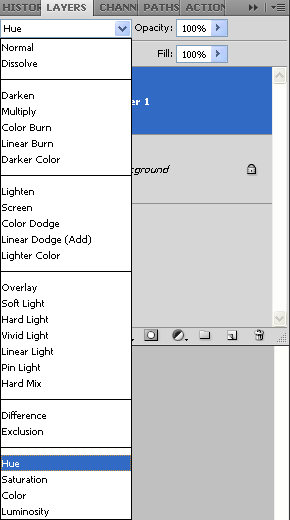
Change the Blend mode of this new top layer to Hue
Final Result
Your image will look like this
If you Think that Tutorial can more better, Please comment us and leave your suggestions.
if you would like to receive more inspiration from us, please consider subscribing to our feed by RSS or by email.
Very useful ! Thanks
Great tip, thanks! I think it even takes less than 2 minutes, with great results 🙂
.-= ptamaro´s last blog ..ptamaro: RT @callumchapman Hand of Callum: The Free Hand-Drawn Vector Font | Circlebox Blog http://bit.ly/57k31T =-.