
How create good looking form without table
This tutorial explains how to design a good form using a clean CSS design with only label and input tags to simulate an HTML table structure. You can use all CSS/HTML elements to design your custom form for your web projects:
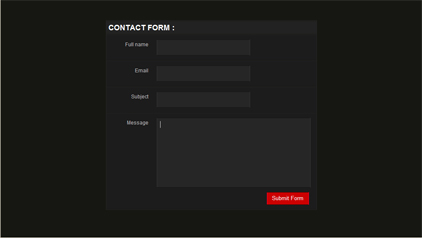
Step 1: Create basic HTML structure
<form> <div class="box"> <h1>Contact Form :</h1> <label> <span>Full name</span> <input type="text" class="input_text" name="name" id="name"/> </label> <label> <span>Email</span> <input type="text" class="input_text" name="email" id="email"/> </label> <label> <span>Subject</span> <input type="text" class="input_text" name="subject" id="subject"/> </label> <label> <span>Message</span> <textarea class="message" name="feedback" id="feedback"></textarea> <input type="button" class="button" value="Submit Form" /> </label> </div> </form>
Step:2 Create CSS Code
*{ margin:0; padding:0;} body{ font:100% normal Arial, Helvetica, sans-serif; background:#161712;} form,input,select,textarea{margin:0; padding:0; color:#ffffff;} div.box { margin:0 auto; width:500px; background:#222222; position:relative; top:50px; border:1px solid #262626; } div.box h1 { color:#ffffff; font-size:18px; text-transform:uppercase; padding:5px 0 5px 5px; border-bottom:1px solid #161712; border-top:1px solid #161712; } div.box label { width:100%; display: block; background:#1C1C1C; border-top:1px solid #262626; border-bottom:1px solid #161712; padding:10px 0 10px 0; } div.box label span { display: block; color:#bbbbbb; font-size:12px; float:left; width:100px; text-align:right; padding:5px 20px 0 0; } div.box .input_text { padding:10px 10px; width:200px; background:#262626; border-bottom: 1px double #171717; border-top: 1px double #171717; border-left:1px double #333333; border-right:1px double #333333; } div.box .message{ padding:7px 7px; width:350px; background:#262626; border-bottom: 1px double #171717; border-top: 1px double #171717; border-left:1px double #333333; border-right:1px double #333333; overflow:hidden; height:150px; } div.box .button { margin:0 0 10px 0; padding:4px 7px; background:#CC0000; border:0px; position: relative; top:10px; left:382px; width:100px; border-bottom: 1px double #660000; border-top: 1px double #660000; border-left:1px double #FF0033; border-right:1px double #FF0033; }
finaly we are done. We have created a good looking form without table. View Example
Related Articles:
if you enjoyed reading this article, please check out other related articles below:


Loading...


Best Tips, Resources and Tutorials for making of Creative Forms using CSS | guidesigner.netsays on : July 3rd, 2009 at 7:05 am Said:
[...] Best Tips, Resources and Tutorials for making of Creative Forms using CSS Friday, July 3, 2009 12:04 Posted in category CSS, Development, Forms, Tutorials No Comments How To Create a Good Looking Form [...]
Echilonsays on : July 14th, 2009 at 7:57 pm Said:
You’re losing the semantic meaning of the labels though. To me, accessability and semantics come first.
20 Creative Web Forms For Design Inspiration | Web Design Tutorials | Creating a Website | Learn Adobe Flash, Photoshop and Dreamweaversays on : July 15th, 2009 at 6:16 pm Said:
[...] to create a good looking form without a table [...]
20 Creative Web Forms For Design Inspiration : tops-post.comsays on : July 24th, 2009 at 6:27 pm Said:
[...] to create a good looking form without a table [...]
Praveen Dewangansays on : September 8th, 2009 at 12:23 pm Said:
This is really awesome example for creating table less structure using div basis.
I am delighted, i m in fact looking for this sample from long back.
Thanks Buddy
Web Design Sydneysays on : September 21st, 2009 at 8:14 am Said:
The main argument for still using tables today stems from bad habits, and complacency. What is often said is that using tables is easier, and that browsers don’t support it.
Stevensays on : September 24th, 2009 at 3:29 am Said:
This is a wonderfully concise tutorial, given the topic. I do have to agree, though, that your labeling structure loses something in accessibility.
Why not wrap the tag in the or a rather than the other way around? And, since you already have IDs associated with your inputs, why not use the
attribute?
You wouldn’t even have to change your CSS significantly, just swap the styles for your styles.
Dansays on : January 8th, 2010 at 9:51 am Said:
Nice little form.
I, too agree that semantics have taken a hit here but the result is good. I think a good follow up would be to show how to improve the form with some simple CSS3 styling like box shadows, rather than relying on the harsh borders to acheive the inset effect.
Dan´s last blog ..Movie Recommendations: January ‘10 Part I
Andy Walpolesays on : January 13th, 2010 at 9:01 am Said:
Here’s what I do with every form.
I create the HTML first and then use the following CSS:
input,
select{
display : block;
}
label {
float : left;
width : 200px;
}
This really lays out the table nicely and from there I can add colour; and yes, no tables are necessary!
Andy Walpole´s last blog ..The internet 10 years ago this month – January 2000
Shamima Sultanasays on : January 24th, 2010 at 5:15 am Said:
Great …it help me a lot…thanks
Murlusays on : January 31st, 2010 at 9:54 pm Said:
This tut is absolutely fantastic!
I was getting so tired of my boss asking me to make forms, getting stuck using tables so this will be a nice breath of fresh air in the designs
Murlu´s last blog ..How To Find Minimal Techno Tracks For DJing 
25 splendidi tutorial per creare form usando CSS e Javascript | Voci dal Websays on : February 4th, 2010 at 9:06 am Said:
[...] 2. Good Looking Form Without Table [...]